Designing a Coffee Companion
Designing an AI-powered coffee companion that helps anyone dial in better coffee, one adjustment at a time.
OVERVIEW
Designing an AI-powered coffee companion that helps anyone dial in better coffee, one adjustment at a time.
Thesis
Solo-built from concept to App Store. Not a traditional UX case study — this documents the design thinking behind a shipped product built through iterative vibe coding.
Coffee brewing is often presented as a hobby for enthusiasts: ratios, grind sizes, yield curves, extraction theory. In reality, most people simply want one thing: the confidence that the coffee they are making will taste good.
The problem is that coffee is not static. Beans evolve after roasting, humidity changes extraction, temperature shifts behaviour, and the same settings that worked yesterday may produce a completely different cup today. Even experienced coffee drinkers can feel like they are guessing.
I designed Professor Bean to remove that uncertainty.
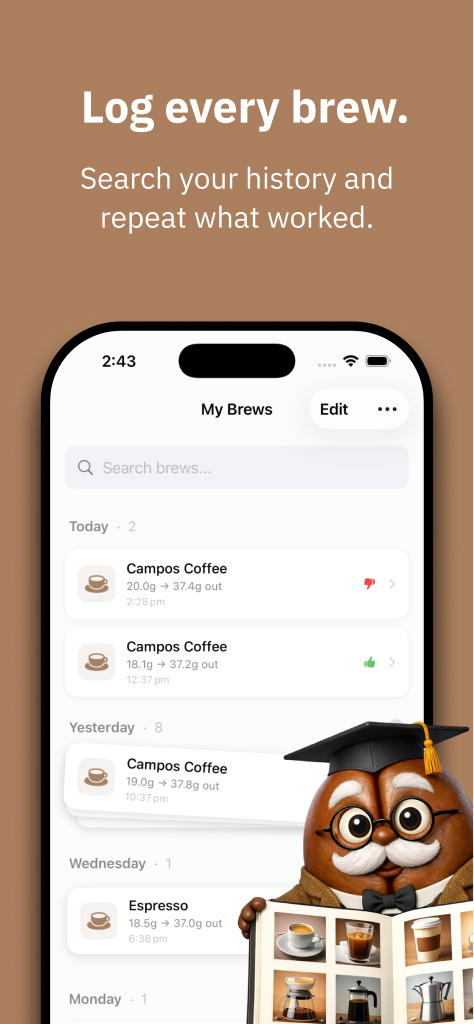
Rather than building another logging tool for coffee enthusiasts, the goal was to create a companion that helps ordinary coffee drinkers dial in their machines confidently, even when they do not have perfect equipment, precise measurements, or deep technical knowledge.
The result is a system that combines adaptive brewing logs, environmental context, playful feedback, and AI-assisted recommendations to turn coffee brewing from a frustrating guessing game into a confident daily ritual.

Design Highlights
Professor Bean explores how thoughtful interaction design, environmental awareness, and AI assistance can turn a complex technical activity into a simple daily ritual. The system combines several design innovations to support that goal.
Radial Scrubber Input
A custom circular control replaces traditional form fields, allowing brewing parameters to be adjusted through a tactile dial interaction rather than typed inputs.One Adjustment at a Time
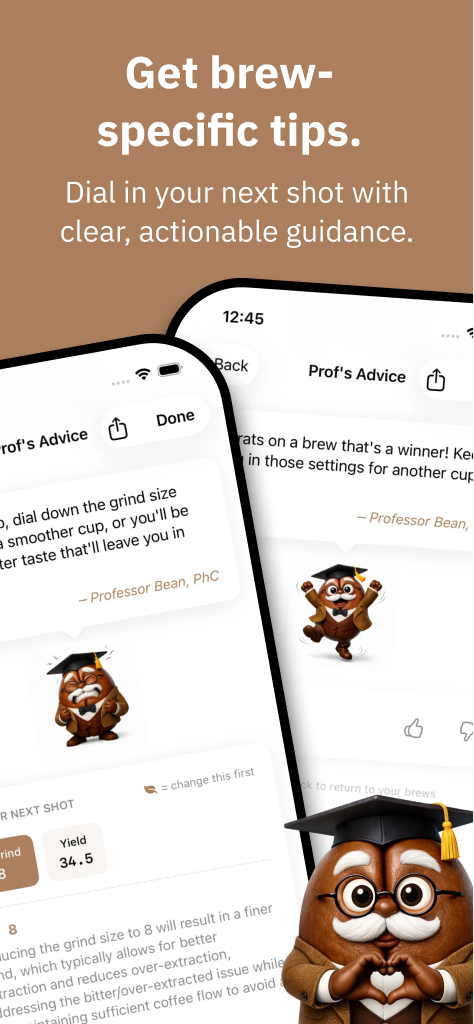
Instead of overwhelming users with multiple variables, the system suggests a single change after each brew, helping users build intuition about cause and effect.Environmental Awareness
Weather conditions such as humidity and temperature are captured alongside brewing parameters to contextualise how environmental changes influence extraction.Flexible Logging
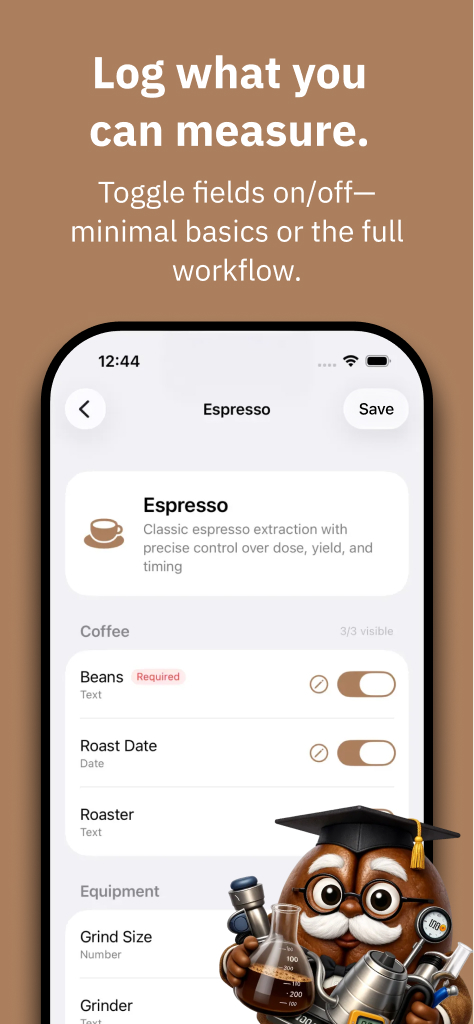
Users can record whatever measurements they have available—precise weights, approximate parameters, or simple taste feedback—allowing the system to remain useful even with minimal equipment.Home Screen Coffee Companion
Home Screen widgets surface the next brew parameters and recommendations directly on the device, allowing users to see Professor Bean’s guidance the moment they unlock their phone.Bluetooth Scale Integration
Connected scales enable automatic dose and yield capture, reducing friction and improving measurement accuracy during brewing.Cross-Device Brewing Experience
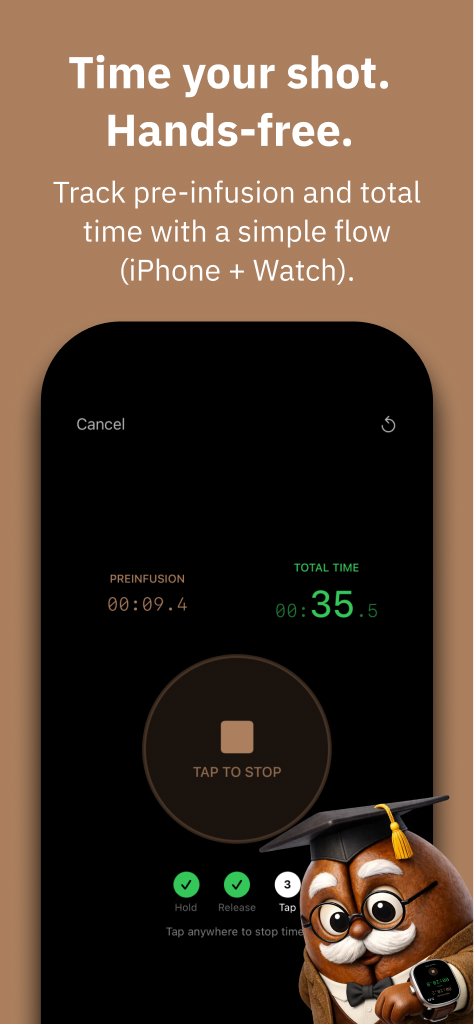
The system synchronises brewing timers and parameters across phone, lock screen, and Apple Watch so users can monitor the process without interrupting their workflow.Animated Character Feedback
Professor Bean provides expressive visual reactions to brewing outcomes, turning technical feedback into a playful learning experience.On-Device AI
Where supported, recommendations run directly on the device, allowing brewing guidance to work offline while preserving user privacy.Native Cross-Platform Experience
Professor Bean is implemented natively on both iOS and Android, ensuring the brewing experience integrates seamlessly with each platform’s ecosystem, including widgets, watch integrations, and device capabilities.
Context
The idea for Professor Bean did not begin as a product concept. It began as a daily workaround.
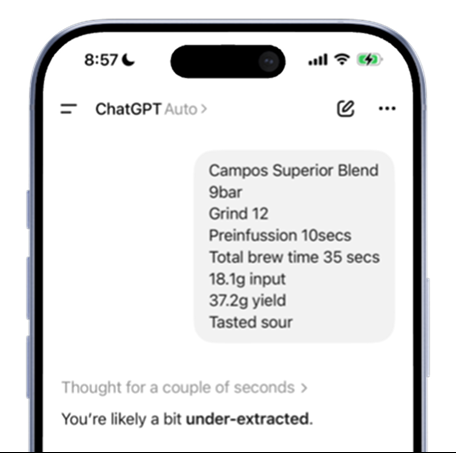
Every morning I would make coffee and try to improve it. If the cup tasted off, I would adjust the grind, the yield, or the brew time. Over time I started typing the parameters of each brew into an AI assistant to ask a simple question:
What should I change next time?
The ritual quickly revealed something deeper.
Coffee beans behave less like a static ingredient and more like a living system. As beans age after roasting they degas, humidity affects extraction, temperature shifts flavour, and small adjustments can dramatically change the result. A setting that produced a great cup yesterday might produce a completely different one today.
This made dialling in a machine frustrating, even for someone who already cared about coffee.
Most brewing tools assume users are experts with precise equipment: scales, refractometers, strict ratios, and detailed measurements. But many people brewing at home simply want to know whether they are moving closer to a better cup or further away from it.
That realisation reframed the problem.
Instead of building a tool for coffee enthusiasts to record data, the opportunity was to design a system that helps people build confidence while brewing, even if their measurements are incomplete, their equipment is basic, or their process is still evolving.
Professor Bean began as an experiment to explore that idea.
Designing for Rituals

Coffee brewing is not a digital activity.
It happens in kitchens, at coffee bars, and beside espresso machines. Your hands are busy, your attention shifts between tools, and timing matters. The software is only one part of a much larger physical process.
Many brewing tools treat the experience as a logging exercise: open an app, enter numbers, review results. In practice, this breaks the natural flow of making coffee.
Professor Bean was designed around a different idea:
The software should adapt to the ritual, not interrupt it.
That principle influenced several design decisions across the system.
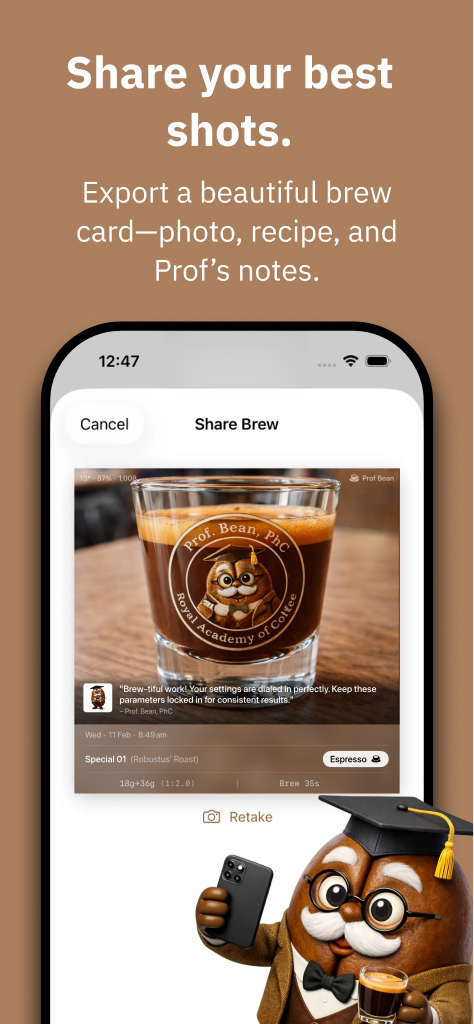
Brewing parameters are adjusted through a radial dial rather than text fields so they can be changed quickly while standing at the machine. Timers synchronize between phone, watch, and lock screen so users do not have to stop the process to check progress. Widgets surface the next brewing recommendation directly on the home screen so guidance is visible before the app is even opened.
Even the character of Professor Bean reinforces this philosophy. Instead of presenting technical feedback through charts and ratios, the system communicates through simple emotional cues that are easy to understand in the moment.
Together, these decisions turn the product from a tool that records brewing into something that participates in the ritual of making coffee.
Brewing Without Perfect Data
Design Principles
Most coffee tools assume ideal conditions.
They expect users to measure everything precisely: dose in grams, yield in grams, brew time, ratios, grind size, temperature. In theory, this produces accurate data. In practice, it creates friction.
When I began testing early versions of Professor Bean in my own daily brewing routine, I immediately ran into the same problem many users face: I didn’t always have the right tools nearby.
Sometimes I had a scale.
Sometimes I didn’t.
Sometimes I could measure yield.
Sometimes I couldn’t.
Traditional logging tools fail in those situations because they treat missing data as an error. If you cannot measure everything, the log becomes useless.
Instead, Professor Bean was designed around a different principle:
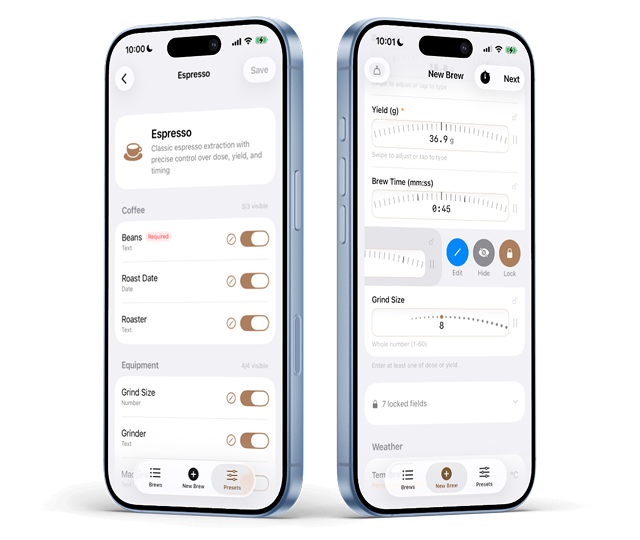
Logging should adapt to whatever information the user can provide.
If a user can measure dose and yield, the system uses that information.
If they can only estimate grind and brew time, that still becomes useful input.
If they can only say whether the coffee tasted good or bad, the system can still learn from that.
This approach reframes coffee logging from a rigid scientific exercise into a flexible feedback loop.
Rather than demanding perfect measurements, Professor Bean focuses on the signal that matters most:
Did the coffee improve?
By allowing partial data, the app remains useful for beginners while still supporting the precision that enthusiasts may want later.
Interaction Design Innovation
From Forms to Physical Interaction
Early versions of Professor Bean worked, but the interaction model felt wrong.
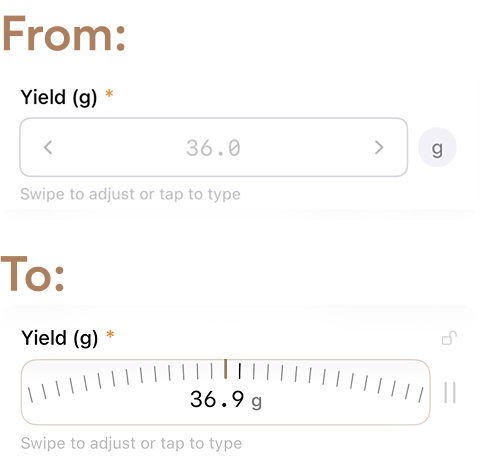
Every brewing parameter—dose, yield, grind adjustments—was entered through text fields. To log a brew, users had to tap a field, edit the value, confirm it, and move to the next one.
It technically worked, but it felt like filling out a spreadsheet.
That friction matters when the interaction happens during a physical activity like brewing coffee. Your hands are busy, your attention is split, and the last thing you want is to stop and edit multiple form fields.
The experience needed to feel more like adjusting a machine than completing a form.
The solution was to design a completely different input mechanism: a radial scrubber inspired by the physical language of analog scales.
The control works like a circular gauge. Users scrub along the edge of the dial to increase or decrease values, with tick marks providing visual feedback and thicker markers indicating larger increments. The motion feels similar to scrubbing a timeline in video editing software—fluid, tactile, and continuous—but arranged radially.
This interaction produced several benefits at once:
Speed — adjustments can be made in a single gesture
Clarity — values remain visible while adjusting
Tactility — the motion mirrors physical equipment controls
Confidence — users can quickly fine-tune parameters without breaking their flow
Designing the control required unusually granular implementation. Rather than relying on standard UI components, the interaction had to be built step by step: constructing the circular dial, defining tick intervals, differentiating primary markers, and calibrating the scrubbing behavior so that small movements produced precise adjustments.
The result transformed logging from a tedious task into something that feels closer to tuning an instrument.
Instead of typing numbers, users simply dial in their brew.
Environmental Intelligence

Coffee Is a Living System
One of the most surprising insights that emerged while building Professor Bean was how sensitive coffee brewing is to the environment.
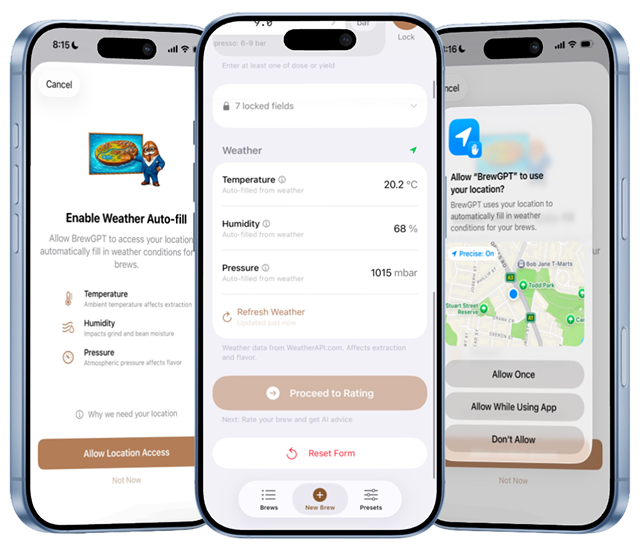
Coffee beans change over time. After roasting they degas, their internal structure evolves, and their behavior during extraction shifts day by day. On top of that, external factors—particularly humidity and temperature—can noticeably influence grind behavior, flow rate, and flavour extraction.
This means the same recipe rarely behaves exactly the same way twice.
Many brewing guides treat coffee parameters as static: a fixed ratio, a fixed yield, a fixed brew time. In practice, experienced baristas constantly adjust those parameters in response to environmental changes.
Professor Bean incorporates this reality directly into the system.
The app captures local weather conditions—particularly humidity and temperature—alongside brewing parameters. This allows the system to contextualize each brew within the environment in which it occurred.
Over time, patterns begin to emerge:
Certain coffees may require slightly finer grinds on humid days.
Flow rates may change as beans age after roasting.
Extraction adjustments may correlate with seasonal conditions.
By treating coffee as a dynamic system influenced by its surroundings, Professor Bean helps users understand that dialing in coffee is not about finding one perfect setting—it is about learning how to adapt confidently as conditions evolve.
This shift reframes brewing from a static recipe into an ongoing conversation between the user, the machine, and the environment.
Personality & Emotional Feedback

One Adjustment at a Time
Brewing tools are often designed for experts. They present multiple variables at once, surface dense information, and assume users are comfortable interpreting ratios, extraction changes, and brewing theory in parallel.
That may work for coffee enthusiasts, but it can easily overwhelm everyone else.
From the beginning, Professor Bean was designed around a different principle:
Only suggest one adjustment at a time.
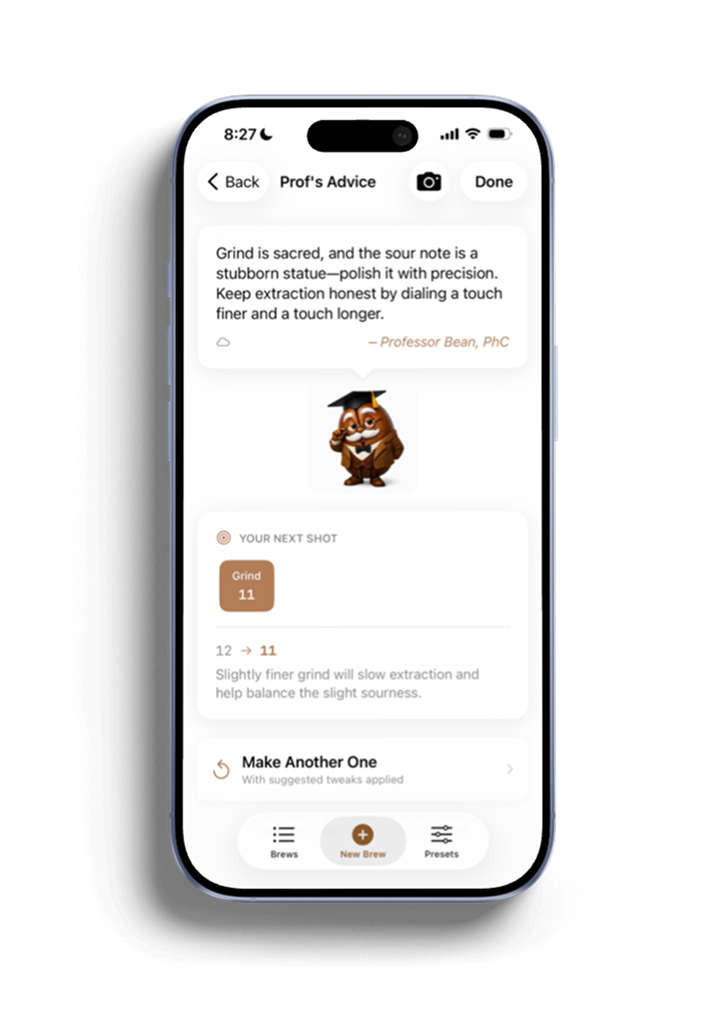
That decision shaped the product in a fundamental way. Instead of flooding users with multiple recommendations—change the grind, reduce the yield, increase the dose, adjust the temperature—the app focuses on identifying the single most helpful next move.
This makes the experience easier to act on and easier to learn from.
If too many variables change at once, users cannot build intuition. They may improve the coffee, but they do not understand why. By narrowing each recommendation to one adjustment, Professor Bean turns brewing into a clearer feedback loop: try one change, taste the result, learn what happened, and continue from there.
The character of Professor Bean helps deliver that guidance in a more human way.
Rather than behaving like a technical dashboard, the app feels like a companion: a slightly grumpy but lovable coffee mentor reacting to how the brew turned out. If the coffee is good, Professor Bean is pleased. If it is not, the character responds with visible disappointment or annoyance.
These reactions are animated, expressive, and intentionally playful. They soften the technical nature of brewing and make the experience feel conversational rather than corrective.
Together, these two decisions—emotional feedback and one adjustment at a time—transform the product from a logging tool into a guided learning experience.
Instead of asking users to become coffee experts all at once, Professor Bean helps them improve through small, confident steps.
The System Expands
From Manual Logging to Connected Brewing
Professor Bean originally began as a manual logging tool.
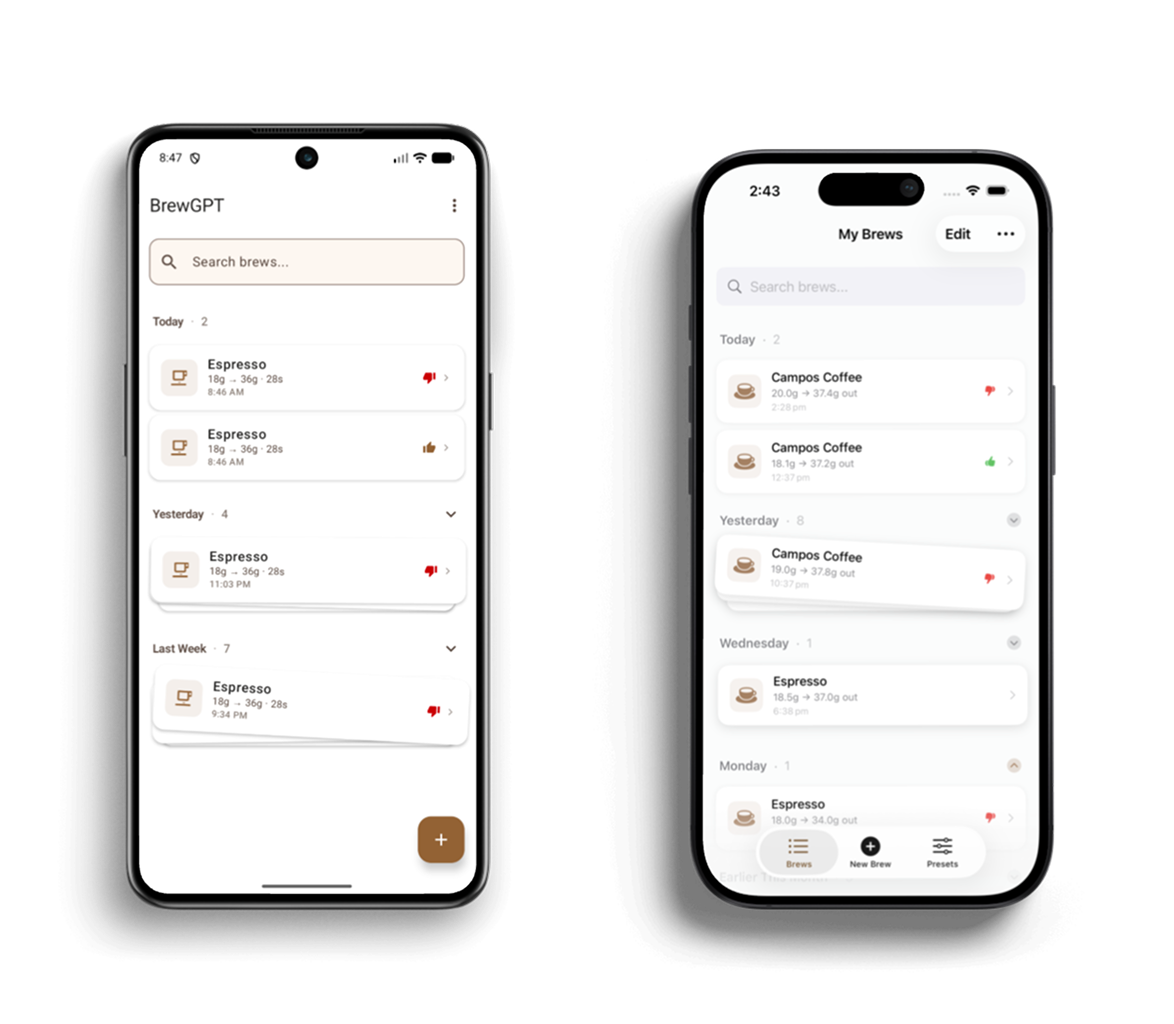
Users would enter brewing parameters themselves: dose, yield, brew time, grind adjustments, and their subjective feedback about how the coffee tasted. This allowed the system to suggest the next adjustment while preserving the principle of changing one variable at a time.
But as I continued using the app daily, my own brewing setup evolved.

After replacing a coffee machine that had failed, I purchased a new scale—one that happened to support Bluetooth connectivity. That moment opened a new possibility: instead of manually entering brewing measurements, the system could capture them directly.
This led to the development of Bluetooth scale integrations, allowing Professor Bean to automatically read brewing data in real time.
As the system matured, the experience was implemented natively across both iOS and Android, allowing Professor Bean to integrate more deeply with each platform’s capabilities. This made it possible to design the brewing workflow as part of a broader device ecosystem rather than a single standalone app.
Today the app supports multiple connected scales, enabling:
Automatic dose measurement
Automatic yield tracking
Real-time extraction monitoring
More accurate brewing logs without additional user effort
The integration significantly reduced friction in the workflow. Instead of pausing to record values, users can simply brew while the system captures the data in the background.
This evolution reinforced an important design principle:
The system should adapt to the user’s setup, not the other way around.
If someone brews with minimal equipment, the app still works.
If they have connected devices, the system becomes more precise.
By supporting both modes, Professor Bean remains accessible to beginners while naturally scaling with more advanced brewing environments.
Brewing Everywhere
Designing for a Real-Time Ritual
Coffee brewing does not happen at a desk. It happens in motion.
Your hands move between grinder, kettle, machine, cup, and timer. You are watching extraction, listening for changes, adjusting on the fly, and trying not to lose the flow. In that kind of moment, even a well-designed app can become a distraction if it asks for too much attention.
Professor Bean was designed around a simple principle:
stay present without getting in the way.
That meant treating brewing not as a screen-based task, but as a physical ritual supported by software across multiple touch-points.
The experience extends beyond the app itself into a synchronized system that includes Apple Watch, lock screen controls, live timers, and Home Screen widgets. Rather than requiring users to stop what they are doing and return to a single interface, Professor Bean keeps the brewing state visible wherever it is most useful.
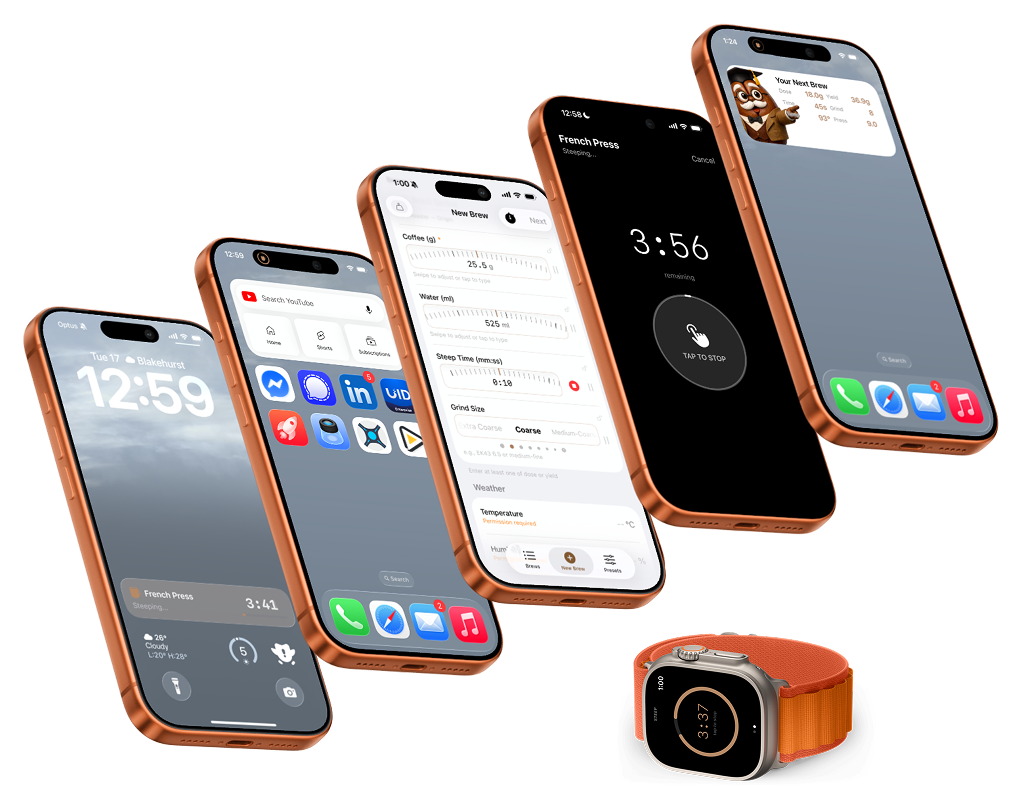
If a timer is started on the watch, the phone reflects it immediately.
If a brewing parameter is adjusted on the phone, the watch updates in real time.
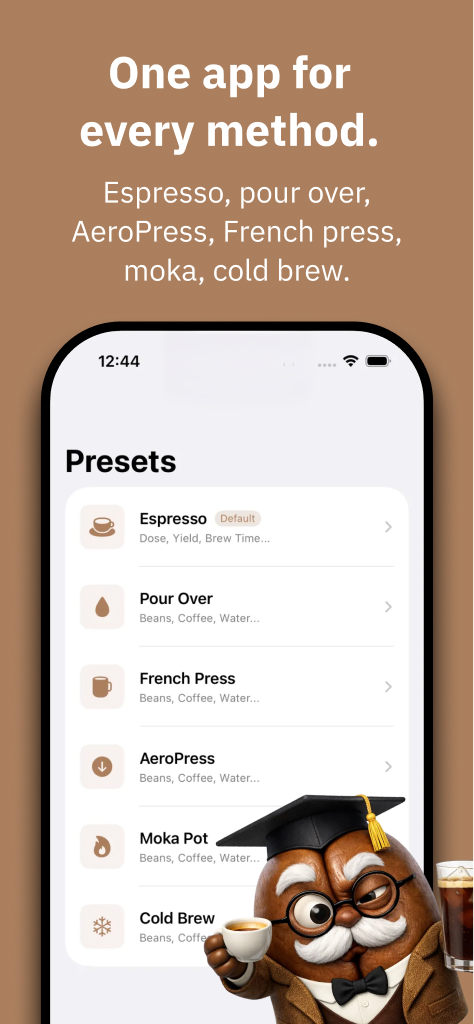
This becomes especially valuable for methods with longer wait times. A French press, for example, may require several minutes of immersion, during which users often step away from the phone entirely. Professor Bean keeps the process accessible through lock screen timers, watch-based progress indicators, and live synchronisation between devices, so the brew remains visible without demanding constant re-entry into the app.
The system also extends to the Home Screen, where widgets surface the most relevant brewing information before the app is even opened. Instead of asking users to remember their last adjustment or reopen the interface to check what comes next, Professor Bean can quietly show:
the recommended next adjustment
current brewing parameters
contextual guidance for the next brew
This shifts the role of the product. It stops behaving like a tool that waits to be opened and starts behaving like a coffee companion that stays close to the ritual itself.
Even the radial scrubber follows this same philosophy. Because it remains synchronized across devices, the brewing state is always visible and adjustable from wherever the interaction makes the most sense in the moment.
The result is an experience that feels less like using software and more like being accompanied through a process.
Instead of interrupting the ritual of making coffee, Professor Bean becomes part of it.
Ethical Product Thinking

Designing for Trust Before Data
From the beginning, Professor Bean was conceived as an ethical product.
Many apps collect extensive user data by default, often long before there is a clear reason to do so. For this project, I deliberately took the opposite approach: the system was designed not to store user brewing data remotely.
The goal was to prioritise trust and experimentation.
Because Professor Bean integrates AI-powered recommendations, it would have been easy to position the product as a typical data-driven service. Instead, the early versions focused on helping users improve their brewing without requiring them to give up ownership of their personal habits.
However, as the system evolved, a new possibility emerged.
If brewing data were collected in a strictly anonymised and aggregated form, it could reveal valuable insights not just for users, but for the broader coffee ecosystem—particularly coffee roasters.
Each bag of coffee beans is designed with a particular flavour profile in mind, but roasters rarely receive structured feedback about how those beans are actually used in the real world.
Aggregated brewing data could help answer questions such as:
What brewing methods are most commonly used with a particular coffee?
How frequently are users over-extracting or under-extracting it?
How often do people report liking the results?
What adjustments lead to better outcomes?
Instead of collecting data for advertising or behavioural tracking, the system could create a feedback loop between coffee drinkers and coffee producers.
This reframes the role of data in the product.
Rather than exploiting user behaviour, anonymised brewing patterns could help roasters improve their roasting profiles, provide better brewing guidance, and understand how their coffee performs in real homes.
In this way, Professor Bean has the potential to become more than a personal brewing assistant. It can act as a bridge between coffee drinkers and the people who roast their beans.
Where supported, Professor Bean runs AI recommendations directly on the device. This allows brewing guidance to work offline while keeping personal brewing data private.
Impact & Reflection

From Guessing to Awareness
The most meaningful outcome of Professor Bean did not come from metrics or feature adoption. It came from a change in behaviour.
Before building the app, making coffee was mostly a routine. If the cup tasted good, that was great. If it didn’t, I might try something different the next day. The process was largely intuitive and inconsistent.
Using Professor Bean every day changed that dynamic.
The app encourages users to record one simple piece of feedback after each brew: Did you like the coffee or not? That single moment of reflection turns brewing into a more intentional experience.
Instead of passively drinking coffee, you begin to pay attention.
Over time, Professor Bean becomes something users see every day—not just when they open the app, but through widgets that quietly surface brewing guidance from the moment the phone wakes. This reinforces the habit of reflection and keeps the next best adjustment close at hand, allowing the product to become part of the ritual rather than a tool used only after something goes wrong.
That small shift compounds. You start noticing flavor notes you might have missed before. You begin understanding how grind changes affect extraction. You recognise when a coffee is improving as it ages after roasting, or when humidity is changing the way it behaves.
The system does not try to turn users into coffee experts overnight.
Instead, it builds confidence through awareness.
Each brew becomes a small learning cycle: brew, taste, adjust, repeat. And because the system suggests only one adjustment at a time, the relationship between action and result becomes easier to understand.
What began as a personal experiment ultimately reframed the brewing experience.
Coffee stopped feeling like something that occasionally worked by luck. It became something that could be understood, improved, and enjoyed more deliberately.
Professor Bean does not aim to make people coffee nerds.
It helps them feel confident making better coffee every day.

Edgar held the role of Independent Consultant at Edgar Anzaldúa in Multiple Locations.